Google Sheet Family Tree Template for Four Generations
This Google Sheet family tree template is an ancestor chart of four generations, from you in box 1 on the left to eight great-grandparents in boxes 8 to 15 on the right. Each box has a row for the name and a row for the dates and the place. Download it as an Excel file, open it in Google Sheets in your own Google account and type into the cells.
The XLSX is free and downloads without an account. Google Sheets opens it in your own Google account, and the file stays in your Drive.
The template sheet
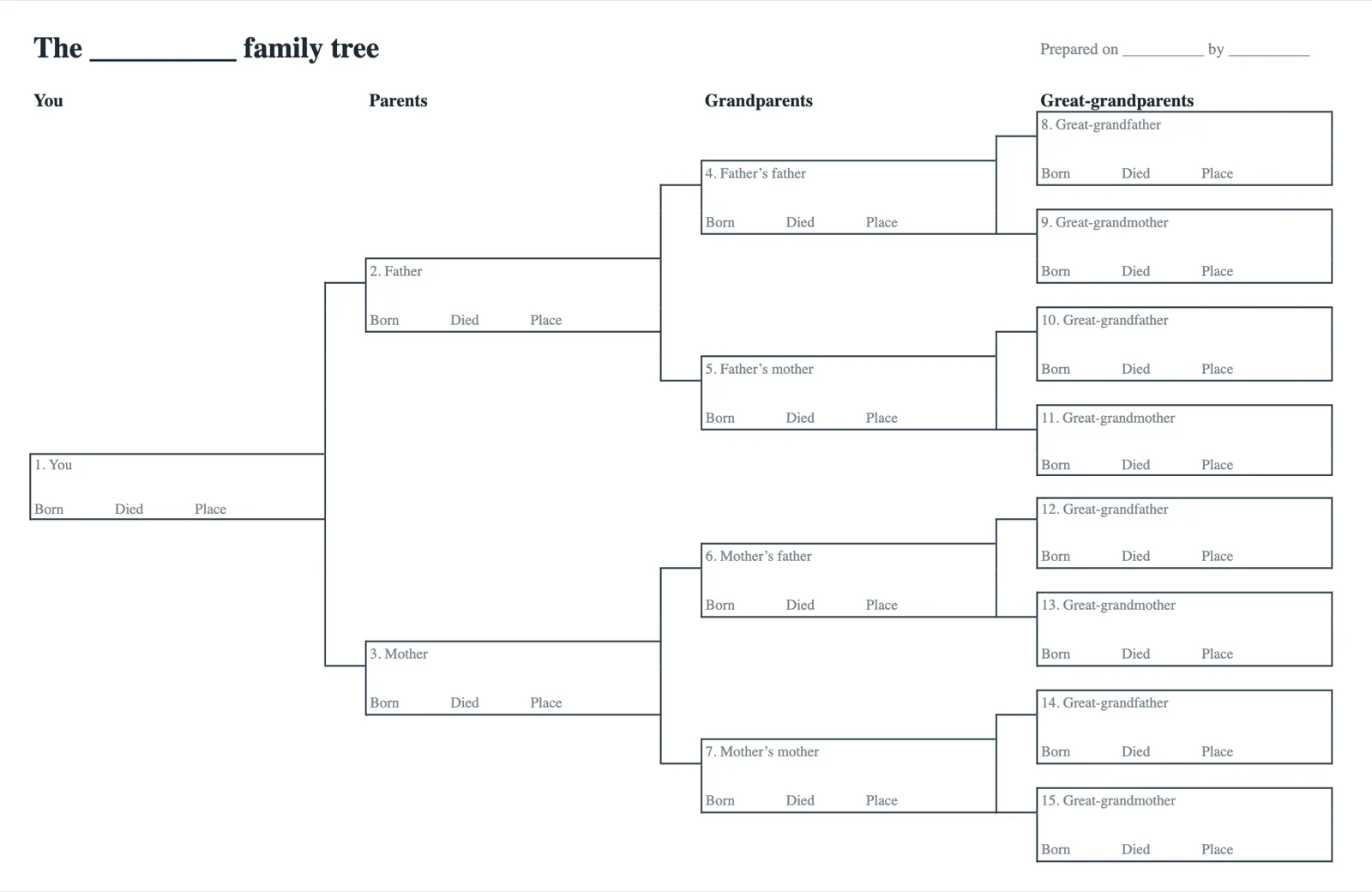
The sheet is an ancestor chart numbered 1 to 15
The template is one sheet titled The __________ family tree, with a line at the top right for the date and the name of whoever prepared it. Its four columns are You, Parents, Grandparents and Great-grandparents, with one, two, four and eight boxes.
Every box is three cells. The top cell is a grey label with the number and the role, such as 4. Father’s father. The bold middle cell is empty for the name, and the bottom cell reads Born, Died and Place. The lines to the parents are cell borders, so typing a name moves nothing.
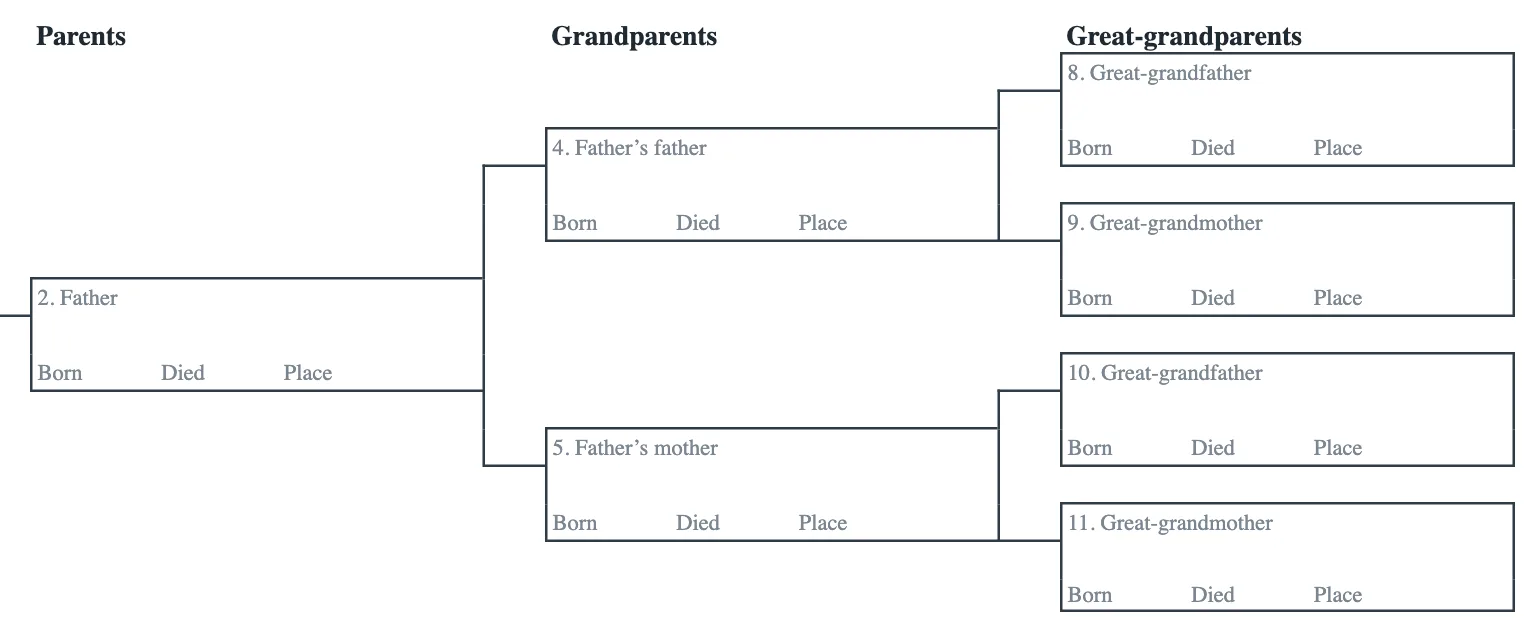
| Boxes | Who they are | Column |
|---|---|---|
| 1 | You | You |
| 2 and 3 | Your father and your mother | Parents |
| 4 and 5 | The father and the mother of your father | Grandparents |
| 6 and 7 | The father and the mother of your mother | Grandparents |
| 8 to 15 | Eight great-grandparents, a man and then a woman in each couple | Great-grandparents |
Open the XLSX in Google Sheets in your own Google account
Google Sheets opens the downloaded XLSX from your own Google Drive, where the file and the names you type stay private until you share them.
- Upload it to Drive. On your computer, go to drive.google.com, click New, then File Upload, and choose family-tree-template.xlsx from your downloads.
- Open it with Google Sheets. In Drive, double-click the file and a preview opens. At the top, click Open with Google Sheets. Changes are saved to that XLSX in your Drive, and the file in your downloads stays as it was.
- Save it as a Google Sheets file. With the file open in Sheets, click File, then Save as Google Sheets. Drive then holds the XLSX and a new Google Sheets file side by side, and the XLSX is not changed.
- Import it into a spreadsheet instead. In Sheets, create a new spreadsheet or open one, click File, then Import, choose the XLSX and click Select. Choose an import option such as Create new spreadsheet and click Import data.
Google offers Open with Google Sheets in the Chrome browser only, and asks you to remove the Office Editing for Docs, Sheets, & Slides extension first if Chrome has it.
Google help for these steps, Upload files & folders to Google Drive, Use both Excel and Sheets, best practices
Type the names in the bold row of each box
Click the empty bold cell under a label and type the name. Write a woman under the surname she was born with, so each line back stays inside its own family.
The bottom cell holds the words Born, Died and Place as one line of grey text. Double-click it to place the cursor and type each date after its word, or select the cell and type over it, for example 1931, 2008, Leeds. Shorten a long middle name to its initial so the name stays inside its box.
Where a name is not known, leave the bold cell empty and write what you do know, such as a place, so nobody mistakes a guess for a record.
Carry a great-grandparent further back on a second tab
Sixteen more boxes would not fit on the printed page, so a great-grandparent goes further back on a chart of their own.
- Duplicate the tab. On the sheet tab at the bottom, click the Down arrow and click Duplicate. The new tab appears next to the first.
- Rename it. Double-click the text on the new tab and type a name that says where it starts, such as From box 8.
- Start from that person. Write the great-grandparent from box 8 in box 1 of the new tab. Boxes 2 to 15 then hold the parents, grandparents and great-grandparents of that person.
To add a row or a column for notes, right-click a row number or a column letter and choose Insert 1 above, below, left or right. Draw the edges of a new box with the Borders button in the toolbar, which also sets the color and style of a border.
An ancestor chart follows parents only, so brothers, sisters and children go in the notes or in the editor described at the end of this page.
Google help for these steps, Protect, hide and edit sheets, Add or move columns and cells, Edit and format a spreadsheet
The Google Sheet family tree template also opens in Excel
The download is one XLSX file for both programs. The Excel genogram guide draws a genogram with shapes and connectors on a worksheet, while this template is built from cells and borders, so a name is typed into a cell and nothing has to be drawn.
| Task | In Google Sheets | In Excel |
|---|---|---|
| Getting the file | Upload the XLSX to your Google Drive and open it in Sheets | Open the downloaded XLSX in Excel |
| Filling it in | Several relatives type into one shared file | Each person types into a separate file |
| Printing | Orientation, paper size and page breaks are set in the print panel | The file is set to print on one landscape page |
| Opening it later | Open it from Google Drive in a browser | Open it from your computer |
For a relative who works in Excel, open the Sheets file, click File, then Download, and choose Excel as the file type. The chart leaves Sheets as an XLSX again.
Google help for these steps, Use both Excel and Sheets, best practices, Create, view, or download a file
The free family tree maker draws the family from a list
A chart of cells holds fifteen ancestors and nobody else. The free family tree maker on this site adds parents, partners, children and siblings, sets each in the right row and draws the lines.
A Google Sheet still suits collecting the facts. Write one row per person under the column heads Name, Born, Died, Father, Mother and Spouse, and save that tab as a CSV file from File, then Download. In the editor, open Export and choose Import a family file, and it reads the columns and draws the tree.
Without an account the editor keeps one tree of up to 50 people in your browser, and its ancestors view draws the same kind of chart as this sheet, with a photo for each person.
Common questions
The Google Sheet family tree template is free
The XLSX costs nothing and downloads without an account. Google Sheets needs a Google account, and the file is kept in the Drive of that account.
Where your file is kept
The XLSX downloads to your computer, and the file you upload stays in your own Google Drive. This site keeps no file in Google Drive.
Why the boxes carry numbers
A number names a place on the chart for good, so a note or a source can point to box 12 and every reader finds the father of the father of your mother. A tab that carries a great-grandparent further back starts again at box 1 with that person.