Fix the table of contents before placing a photograph
A family tree book goes wrong when the photographs are placed first and the structure is squeezed around them. Decide the pages in order, and only then count how many pictures the book can hold. The contents below suit a memory book of 40 to 60 pages about three or four generations.
Front pages
- Title page with the family name and the years the book covers
- A note on who made the book, when, and for whom
- How to read this book, with the key to its symbols and numbers
- The whole family on one chart across two pages
One chapter for each generation
- Chapter opening with a chart of that generation only
- A person card for each member of the generation
- Photograph pages for the years when that generation was young
- A page of stories, recipes or letters in the words of the family
Back pages
- Memorial pages for relatives who have died
- Relationship index of every person in the book
- List of photographs with dates, places and owners
- Sources, thanks and blank pages for later additions
Genogram Builder
Draw the chart for the opening spread
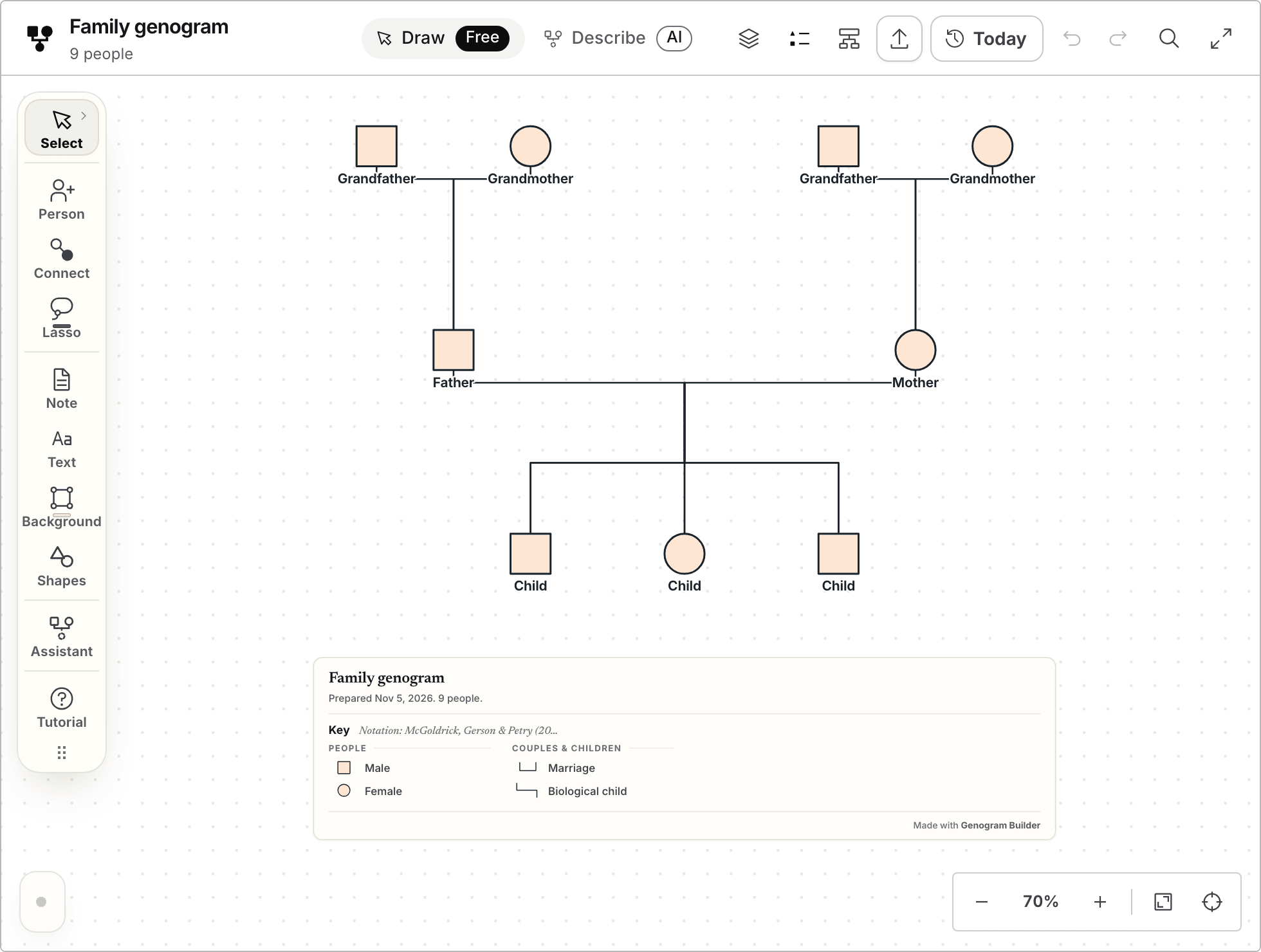
Build the family once in the editor, then export the chart for the front of the book.
- Opens without an account
- A key is drawn on every export
- PNG and PDF export with a free account, with a watermark
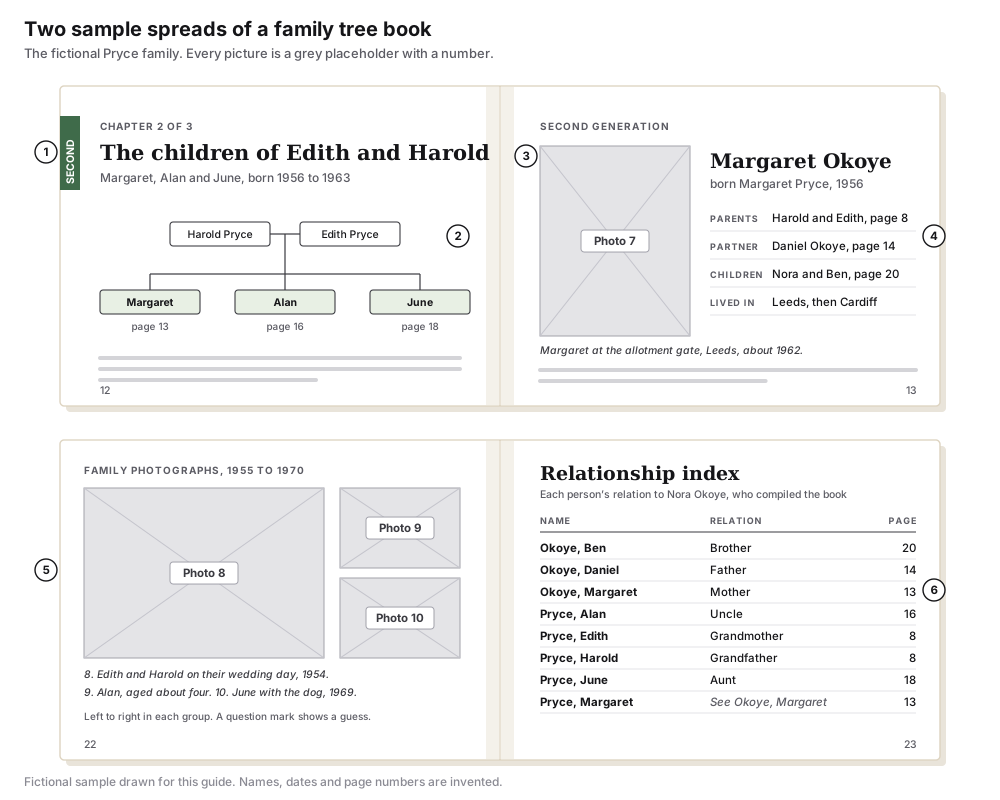
The sample spreads show six parts that repeat through the book
The drawing at the top of this page shows two spreads from a book about the fictional Pryce family, compiled by a granddaughter, Nora Okoye. A spread is the pair of pages a reader sees at once, so design in spreads and never in single pages.
| Mark | Part | What it does |
|---|---|---|
| 1 | Generation tab | A coloured strip at the edge of the page that names the generation |
| 2 | Chart strip | A small chart of one couple and their children, with the page of the card of each child |
| 3 | Photo slot | A grey box with a number that stands for one photograph until the scan is ready |
| 4 | Person card | The same fields in the same order for every person, with page numbers |
| 5 | Captions | One numbered caption for each photograph, set under the group |
| 6 | Relationship index | Every person by surname, with their relation to the compiler and a page number |
Choose one generation order and keep it
There are two common orders for the chapters. Oldest first begins with the earliest known couple and moves towards the present, which reads as a story. Youngest first begins with the compiler or the child the book is for and steps back a generation at a time, which matches how the research was done.
Whichever order you choose, number the generations and print the number on the tab of every page. Within a chapter, place siblings from oldest to youngest.
| Order | How the chapters run | Suits |
|---|---|---|
| Oldest first | Great-grandparents, grandparents, parents, then the present generation | A book for a reunion or an anniversary |
| Youngest first | The child or the compiler, then parents, grandparents and beyond | A book for a child, or a family with gaps further back |
| By branch | One part for the line of each grandparent, oldest first inside each part | Large families whose branches rarely met |
Give every person the same card
A person card is a fixed block of facts that looks the same on every page. Readers learn where to look after two cards, and gaps become visible to the compiler. Keep the card to what the family is happy to print.
| Field | What to write | When it is not known |
|---|---|---|
| Name | The name used in the family, then the full name | Write the name people used and say that it is one |
| Born and died | Years, or full dates for people who have died | Write about and the nearest year |
| Parents | Both names, with the page of each card | Keep the line and write not known |
| Partner and children | Names with pages, in order of birth | Leave the line out if there were none |
| One line | A sentence the family would recognise | Use a line from a letter or leave it blank |
Size the photo slots before scanning
A photo slot is a grey box of a fixed size with a number in it. The number ties the slot to a line in the list of photographs, so the layout can be finished and checked while the scanning is still going on.
Print needs about 300 pixels for every inch of the printed picture. A slot four inches wide and six inches tall therefore needs a scan of at least 1,200 by 1,800 pixels, and a full page of eight by ten inches needs 2,400 by 3,000. Scan a small print at 600 dots per inch so that it can be printed at twice its size.
Keep faces away from the inner edge of the page, where the binding hides about half an inch, and write each caption as who, where and when. The guide to family tree quotes has caption patterns and wording for memorial pages.
Build the relationship index from the person cards
The relationship index is the page relatives turn to first. It lists every person once by surname, states how each is related to one starting person, and gives the page of their card. In the sample that person is Nora, so Edith Pryce is listed as grandmother and Alan Pryce as uncle.
A person who changed their name gets a second entry that points to the first. Margaret appears under Okoye, with a line under Pryce that sends the reader there. Say at the top of the index whose relations these are, because the same woman is a mother, an aunt and a grandmother to different readers.
Put a chart at the front and at each chapter opening
A chart of the whole family belongs on the first spread after the contents, and a smaller chart opens each chapter. Draw them all in one style.
The charts can be drawn by hand, in a word processor or in the editor on this site, which exports PNG and PDF files with a free account. Free exports carry a faint repeated watermark and paid plans export without it, so decide which you need before designing the opening spread. The template library has blank sheets to print and fill in by hand.
Ask living relatives before printing their details
A printed book is passed around, copied and left on shelves for decades. Ask each living adult what they are content to see in it, and ask a parent or guardian for each child. Years of birth are usually enough for the living, and addresses never belong in the book.
Photographs need the same care. The person who took a picture, or the studio, may hold rights in it, so note the owner of each photograph in the list at the back.
Common questions
Which page size suits a family tree book layout
A4 or US Letter in portrait suits person cards and costs the least to print. A square or landscape book suits photographs. Choose the size before drawing any slot, because every measurement depends on it.
How many pages the book should have
Count one page for each person card, add the photograph pages and about ten pages for the front and back. Printers that staple or sew folded sheets need a page count that divides by four.
Draw the chart for the opening spread. No account is needed to begin.
Open the blank three generation sheet