Three-Generation Genogram Template
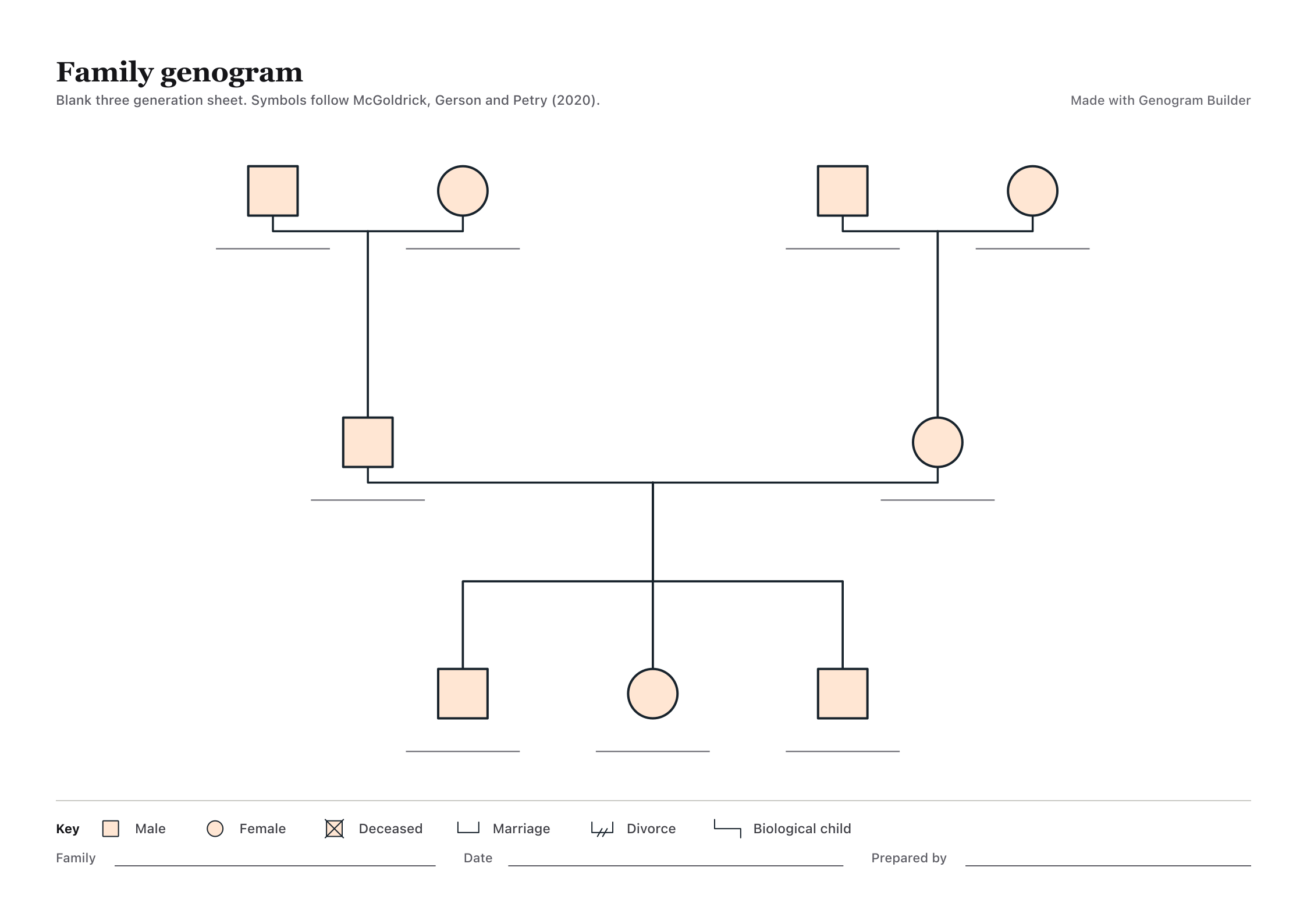
This three-generation genogram template starts with two sets of grandparents, two parents and three children already connected. Edit it online or download a blank A4 worksheet to fill in by hand.
Edit this three-generation template online
Select a person to replace their placeholder name and add dates. Edits stay in this tab until you continue in the full editor, which keeps the chart. Sign in for free to export your edited chart.
Start by changing one name on each row. If a person on the sheet does not belong in your family, select that person and remove the placeholder. Add missing relatives with the Person tool or from an existing person’s controls. Use Connect to check which adult or partnership a child is attached to. These changes affect the chart itself, so you can see whether the family structure still reads correctly after the names change.
If you are testing the layout, use initials or fictional names first. The online template starts a separate chart in this tab and leaves the family saved on the homepage alone. Reset restores the original nine placeholders. Before leaving a chart you want to keep, use Export. A free account can export a project backup or a watermarked image or PDF.
What the three-generation genogram template includes
The sheet gives you nine positions in three rows. At the top are two pairs of grandparents. The middle row has one parent descended from each pair. The bottom row has three children connected to the parents above. Each person has a symbol and a blank name line, and the footer leaves space for the family name, the date and the preparer.
A genogram adds relationship information to a family tree. The worksheet’s key explains which marks show a marriage, a divorce, a biological child or a death. Start by tracing the vertical lines. A child’s branch should reach the adults who are that child’s parents in the diagram. Add details such as a year or a significant relationship only where they help answer the question you are drawing the chart for.
The layout is a starting arrangement for a small family. If you have more siblings, a single parent, a former partner or two households to show, keep the generation rows and change the links that need to change. You can compare other layouts in the completed genogram examples before choosing where to place someone.
Fill in the worksheet from top to bottom
- Grandparents. Put one side of the family on each side of the top row. Write names on the lines under the symbols and known birth years above. If you know one grandparent’s name but little else, the name is enough to start. Leave the date blank until you can check it.
- Parents. Follow each line down from the grandparents to their child in the middle row. Then look at the line joining the two parents. If they divorced or one had another partnership, mark the change on the relevant connection. Leave room beside that person before drawing a second couple line.
- Children. Fill in the bottom row from oldest to youngest within each sibling group. If children have different parents, attach each child to their own parental branch. The half-sibling example shows how two branches can share a parent without suggesting that all the children have the same two parents.
Imagine a fictional child named Jordan. Jordan’s mother, Elena, belongs under Elena’s parents. Jordan’s father, Mateo, goes under Mateo’s parents. Jordan and a sibling who share both parents hang from the same couple line. If Mateo has an older child with a former partner, that child stays on the lower row but connects to Mateo’s earlier partnership. The order of the rows remains the same even though the bottom branch changes.
Trace the example back upward as a final check. Start at Jordan, follow the child line to Elena and Mateo, then follow each of their branches to the grandparents. If you can do that without guessing, you have a readable family structure. If two lines run too close together, leave more space between their labels before adding any emotional or health information.
Choose PDF, PNG or online editing
Use the PDF if you want to fill the three-generation genogram template in by hand. The download is an A4 landscape page. Check your print preview first, especially on US Letter paper. Fit the entire page inside the printable area if the printer clips the key or the writing lines at the bottom. Leave enough space around the sheet to add a handwritten note beside a person.
Use the PNG when you want a blank picture in a slide, handout or report. Resize it by a corner to preserve the proportions, then check the labels at the size readers will see. To draw the chart with Word shapes or copy your own diagram into a document, follow the guide to making a genogram in Word.
Choose the online editor when the family needs a different shape. It is easier to add a partner, move a person or reconnect siblings in the editable chart than to squeeze the information into a fixed print layout. The export guide explains how to choose a file for printing, sharing or opening the project again.
Check names, dates and relationships before sharing
Use the same name or initials for each person everywhere they appear in your notes. Keep approximate years marked as approximate, and leave missing dates blank. A line between two people can record a family connection, an emotional relationship or something else described in the key. The reader should be able to tell which one without asking you.
For a class submission, read the assignment before adding sensitive information. It may ask for three generations and relationship labels without requiring exact birth dates or full names. If you are drawing a real family, share only the detail the recipient needs. Keep the working copy separate from the version you send, so you can leave out identifying notes without losing your own record.
Give the page a date, even if many dates on the chart are approximate. That tells the next reader when the relationships were recorded. If you later learn that a child belongs on another branch, keep a copy of the earlier chart and date the correction. When several people are checking a diagram, ask them to trace one line from the focus person to a grandparent and explain it back to you. Their reading can reveal an ambiguous connection that you missed while drawing.
Common questions
Is the three-generation genogram template free?
Yes. The blank PDF and PNG download without an account, and you can edit the template online as a guest. Sign in to export an edited version. If you only need a printed blank sheet, download the PDF and open it directly in a PDF reader.
Who counts as the three generations?
Count family levels from the person you are focusing on. On this sheet the children, their parents and their grandparents make up the three generations. If the focus person is an adult, you can label the same rows for that adult’s parents, their own generation and their children.
Can I use the template when I only know one side of my family?
Yes. Fill in the branch you can confirm and leave the other side open. A short note can explain whether a person’s name is unknown or whether you have chosen to omit information. If the fixed worksheet implies relationships you do not have, remove those placeholders in the online editor.