Four ways to make a genogram on a Mac
The right way to make a genogram on a Mac depends on where the chart has to end up and on how often you draw one. A chart for one class can come from any of these. A chart you will revise for years needs a file you can open again, so the formats matter as much as the drawing.
| Way of working | Examples on a Mac | What to expect |
|---|---|---|
| A browser editor | Genogram Builder, Visio for the web, a Google Docs drawing | Nothing to install, and the work is kept where the service keeps it |
| A slide or document app | Keynote, Word or PowerPoint for Mac | Shapes and lines placed by hand, with the key drawn by you |
| An installed genogram app | The GenogramAI desktop app on its Clinical plan | Charts kept on the Mac, at the price of that plan |
| A Windows program | GenoPro | Runs through CrossOver or a multi-boot utility, as GenoPro describes |
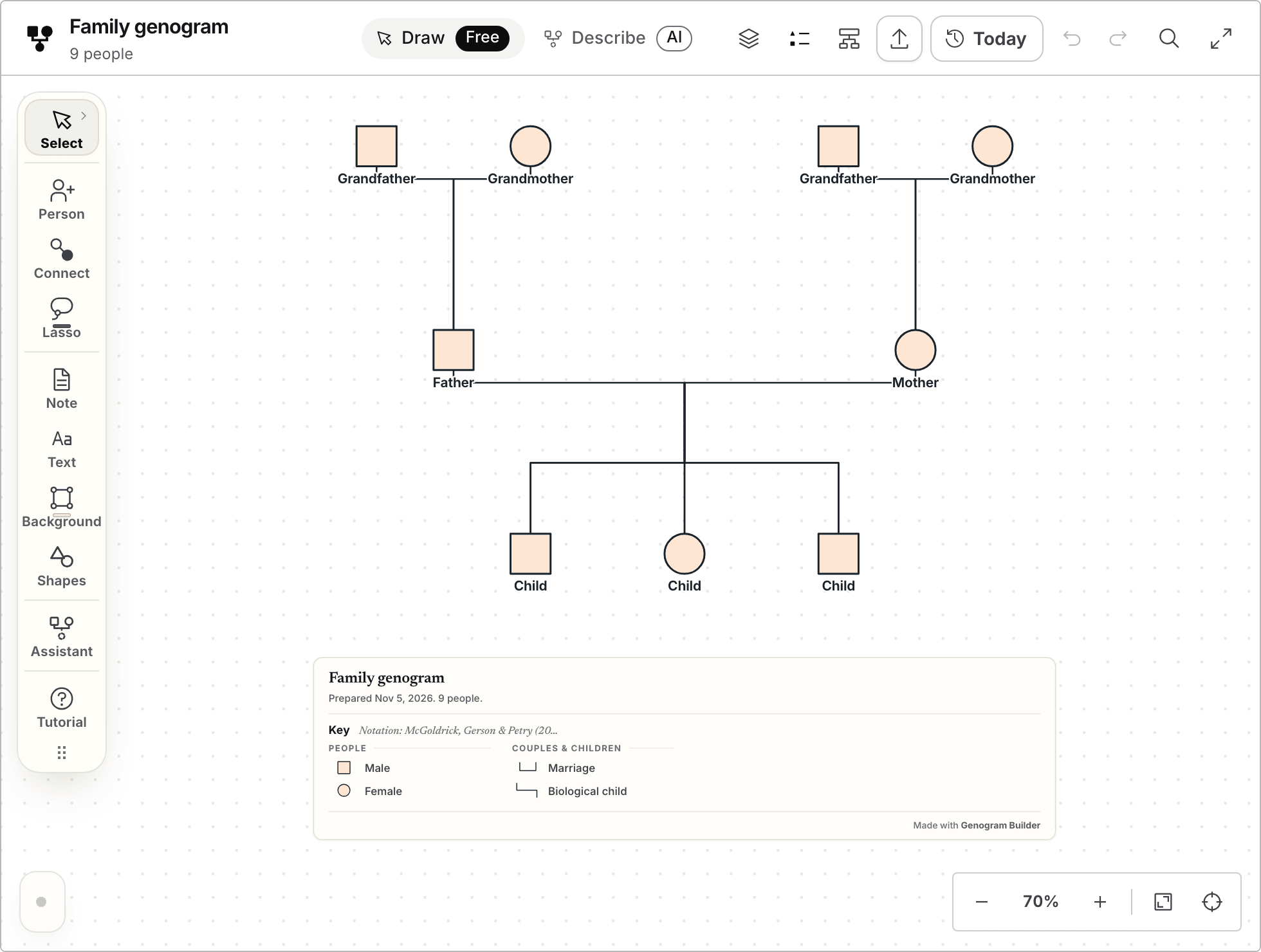
Genogram Builder
Draw the genogram in Safari or Chrome
Genogram Builder runs in the browser, so the Mac needs nothing installed, and the symbols, the lines and the key are drawn for you.
- Opens without an account
- Runs in Safari, Chrome and Firefox
- PNG and PDF with a free account, watermarked
A browser editor needs nothing installed on the Mac
Genogram Builder runs in Safari, Chrome and Firefox on macOS. The editor on the home page keeps the chart in the browser between visits, and a free account keeps it in your account as well. The blank template on this site opens a preview, and Continue in the full editor carries that chart to the home page, where it is kept. Its import reads a family file from GEDCOM, GenoPro, Gramps, Mermaid or a spreadsheet, and a file of up to 50 people opens without an account. That makes the browser a good first step for a family that already sits in a genealogy program.
Microsoft has no desktop version of Visio for macOS. It says that Visio for the web lets you view, create and edit diagrams in Safari or Chrome on a Mac with a Visio Plan 1 subscription, and a lighter web app called Visio in Microsoft 365 comes with many work and school Microsoft 365 plans. The guide to drawing a genogram in Visio covers the shapes and connectors there.
A Google Docs drawing also works in a browser on a Mac, and the Google Docs guide walks through it.
For other devices, see the guides to genogram apps for iPad and genogram software for Windows.
Keynote joins shapes with lines that stay connected
Keynote comes from Apple, and its connection lines suit a genogram. Apple describes a curved, straight or right-angle line that keeps two objects joined when either one moves. That is what a couple line needs, so the family can be spaced out without redrawing it.
- Place the people
Click Shape in the toolbar, add a square for each man and a circle for each woman, and set them out in rows, one row for each generation.
- Add a connection line
With two partners on the slide, click Shape in the toolbar and choose the curved line.
- Snap the ends
Drag one end of the line until it snaps to one partner, then drag the other end until it snaps to the other.
- Make the line square
Select the line, open the Format sidebar, click the Arrange tab and choose Straight or Corner.
- Add the names and the key
Put each name and year in a text box under its symbol, and draw a small key with the marks the chart uses.
Word and PowerPoint for Mac draw the shapes by hand
Word and PowerPoint for Mac both insert shapes, and Microsoft’s Windows steps say that holding Shift while you drag makes a perfect square or circle, so check it on your Mac. The steps for connectors that Microsoft publishes are written for Windows, so check them on your own Mac before relying on them. The guide to making a genogram in Word and the PowerPoint guide cover both programs, and the Excel guide covers a worksheet.
Few genogram programs install directly on macOS
GenogramAI lists a desktop app for the Mac on its Clinical plan, which it prices at $19 a month billed annually. The rest of its plans run in the browser. The comparison with GenogramAI sets out what each plan includes.
GenoPro is a Windows program. Its purchase page says that you may run it on a Mac by installing CrossOver or a multi-boot utility that supports Windows, and that GenoProX will include Mac and iOS versions, without a date. The comparison with GenoPro covers its licence and its files.
The draw.io project offers a free desktop app for Windows, macOS and Linux. It is a general diagram editor, and its site mentions no genogram library, so the symbols are drawn from basic shapes.
The file a program saves decides where the chart can go next
A picture is easy to share and hard to change. Keep the editable file of every chart, and export a picture only for the document, the slide or the print.
| File | Made by | What it keeps |
|---|---|---|
| GNO | GenoPro | People, families and relationships, which Genogram Builder can import |
| GED | Family tree programs | People, dates and families, which Genogram Builder can import |
| VSDX | Visio | Shapes that open again in Visio or Visio for the web |
| JSON | Genogram Builder | A project backup that opens again in the editor |
| PNG and PDF | Most of these tools | A picture or a printed page rather than editable shapes |
Export the chart from the browser as a picture or a project
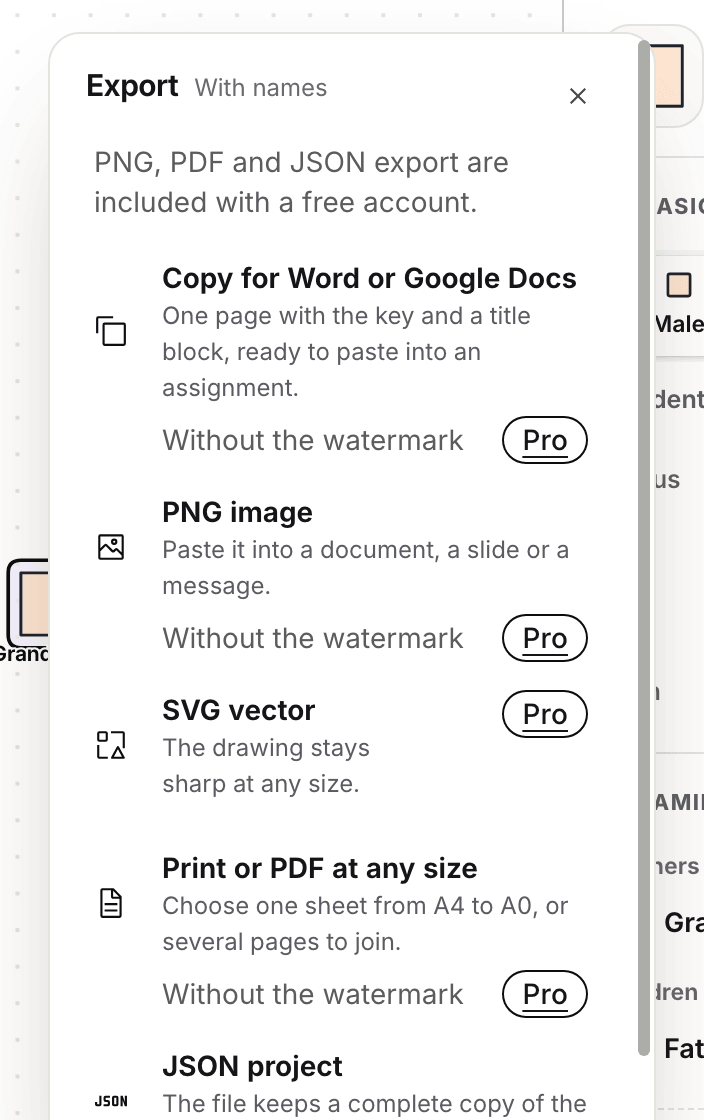
In Genogram Builder the export is the same on a Mac as anywhere else. Drawing needs no account. Exporting needs a free account, which saves a PNG, a PDF or a JSON project with the Genogram Builder watermark on the pictures, and Pro removes the watermark and adds SVG.
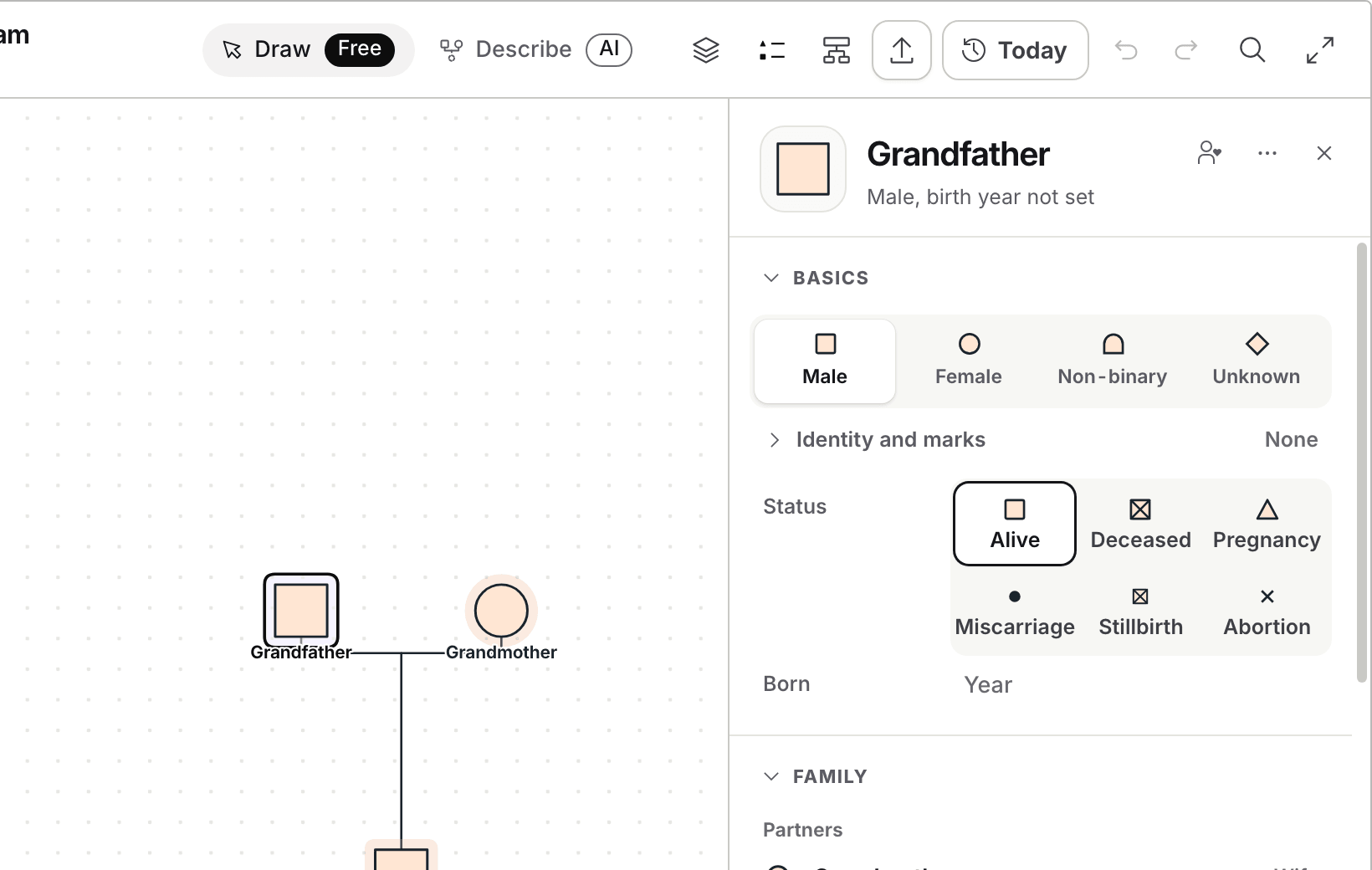
Open the blank three generation chart and select a person. Type the name at the top of the panel that opens, then set the status and the year of birth.
Open Export and choose PNG image for a document or a slide, Print or PDF for paper, or JSON project to keep a copy you can open again.
Common questions
Whether Genogram Builder has a Mac app
No. It runs in the browser on any computer or tablet, so there is nothing to download, and the same chart opens on a Mac and on a Windows computer once it is saved to an account.
Moving a chart from GenoPro to a Mac
Open the editor, choose Export and then Import a family file, and select the GNO file. The import shows how many people and couples it found before anything is placed.
Which way suits a class assignment
A browser editor or Keynote. Both run on any recent Mac without a licence for a Windows program, and both export a picture for the paper. The guide to writing a genogram paper covers the rest.
Sources and methodology
We make Genogram Builder. We used the references below for this guide. Last checked on 5 November 2026.
Open the blank three generation template in Safari or Chrome and type the names in. No account is needed to begin.
Start drawing on your Mac