Genogram software for Windows installs, comes from the Store or opens in a browser
The choice of genogram software for Windows turns on how the program gets onto the computer, where it saves, what happens without a connection and which files come out.
| Program | Installation | Saving | Without a connection | Export |
|---|---|---|---|---|
| GenoPro 2020 | A Windows installer of 6.1 MB | GNO files on the computer | Not described on its pages | HTML reports, PDF and interactive SVG |
| WinGeno 2.0 | A Windows download or a portable version | Files on the computer, with no cloud | Not stated | PDF and PNG with a legend |
| GenoSystems | Microsoft Store, Windows 10 version 17763 or later | Encrypted on the computer | Makes no network connections, its listing says | SVG, PNG and PDF |
| draw.io desktop | Installer, MSI or zip, version 32.6.10 | DRAWIO files that you place | Needs no connection | PNG, SVG, JPEG, PDF and more, from general shapes |
| Genogram Builder | Nothing, it runs in Edge, Chrome or Firefox | In the browser, and in an account when you save there | An open chart keeps editing and saving, and the page will not reload | PNG, PDF and JSON with a free account, SVG on Pro |
| GenogramAI | Runs in the browser, with a Windows app listed as coming soon | Synced to its cloud | The web app needs a connection, its own comparison says | PNG free, and PDF, SVG and GEDCOM paid |
Genogram Builder
Draw the genogram in Edge or Chrome
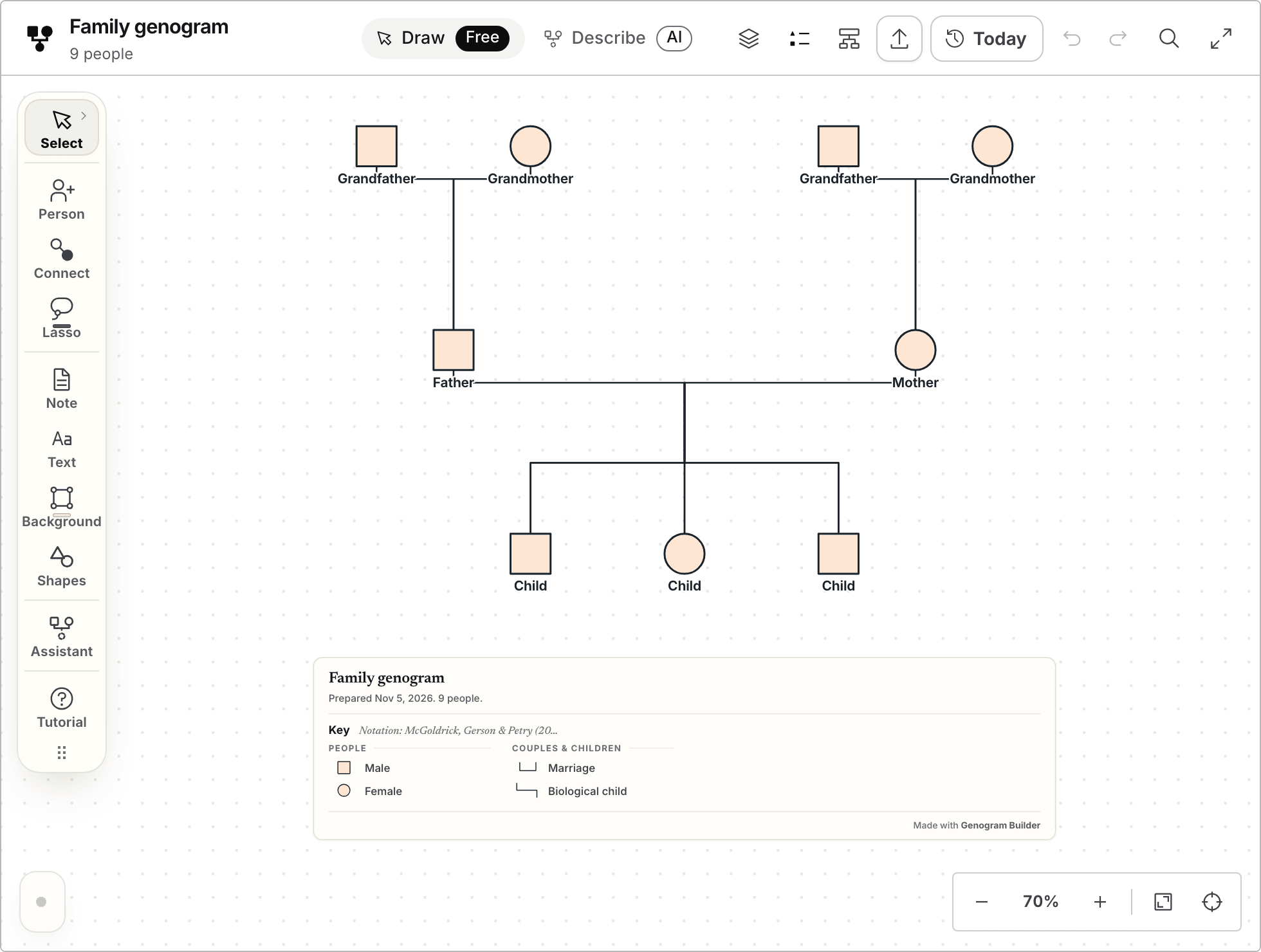
Genogram Builder runs in the browser on Windows with nothing to install, and the symbols, the lines and the key are drawn for you.
- Opens without an account
- Kept in the browser, or in an account
- PNG and PDF with a free account, watermarked
One base chart was carried through Genogram Builder from start to export
The base chart is the blank three generation template, with four grandparents, two parents and three children. We have no Windows computer, so the steps ran in Chromium, the engine of Edge and Chrome, and in WebKit, on a Mac. The Windows file dialogs were not tested, and the other programs were not installed.
| Step | What happened in Genogram Builder |
|---|---|
| Open the chart in the full editor | The nine people opened |
| Press C for Connect, click two grandparents and choose Partners | A partner line joined them |
| Reload the page | The chart came back with “Your edits were restored” |
| Turn the network off and move a grandmother with the arrow keys | The move was saved in the browser |
| Reload with the network off | The page did not load, and the move was there once the network returned |
| Export as a visitor | The editor asked for a free account first |
| Export with a free account | PNG, PDF and JSON downloaded, and SVG pointed to Pro |
| Export with the network off | JSON downloaded, and PNG and PDF stopped with an error |
Installation ranges from a setup file to nothing at all
GenoPro installs from a setup file of 6.1 MB. Without registration it stops at 25 individuals, and a free evaluation key opens every feature for 14 days. Students get 180 days free when their professor joins its academic program. GenoPro says that the price of GenoPro 2020 will be credited towards GenoProX, which is planned with Mac and iOS versions.
WinGeno 2.0 offers a Windows download and a portable version, with no account, and its browser edition keeps the work in memory without saving it or making a PDF. GenoSystems comes from the Microsoft Store, and its listing names version 1.1.0, updated on 18 October 2026. draw.io publishes an installer, an MSI package, a zip file and ARM builds, and version 32.6.10 came out on 4 November 2026.
Genogram Builder needs nothing installed, which suits a lab or office computer where software cannot be added, as long as the browser keeps website data between sessions.
Each program keeps the chart in a different place
GenoPro, WinGeno and GenoSystems keep the chart in files on the computer, so a backup is a copy of those files. GenoSystems adds a password, locks itself after a time you choose and offers encrypted backups.
Genogram Builder keeps one genogram of up to 50 people in the browser without an account. A free account keeps two genograms in the account, which opens them on any computer, and a JSON project keeps an editable copy wherever you put it. On a shared computer that clears its browser data, save to the account or export the JSON project before you leave.
The file you keep decides whether the chart can be edited again
A picture or a PDF is what a reader needs, and an editable file is what you need to change the chart next month, so keep both.
| File | Made by | Opens again in |
|---|---|---|
| GNO | GenoPro | GenoPro, and Genogram Builder through Import a family file |
| GENO | WinGeno 1 | WinGeno 2.0, with no conversion |
| Encrypted genogram file | GenoSystems | GenoSystems, with its password |
| DRAWIO | draw.io | draw.io on Windows, macOS, Linux or the web |
| JSON project | Genogram Builder | Genogram Builder through Import a family file |
| PNG, PDF and SVG | All of these programs | An image viewer, a word processor or a printer |
Prices run from free programs to a one-time licence
GenoPro sells a licence for one user at $49, paid once with a permanent registration key, and an academic site licence at $395. WinGeno, GenoSystems and draw.io are free. Genogram Builder has a free plan, and Pro is $12 a month or $99 a year. GenogramAI has a free plan of two projects, and Professional is $12 a month.
For a class assignment, the deciding point is the file your course asks for. For a family you will keep changing, choose the program whose editable file you can open again on the next computer. The comparison with GenoPro and the comparison with WinGeno go further.
Common questions
Whether Genogram Builder installs on Windows
No. It runs in Edge, Chrome or Firefox on Windows, and a chart saved to a free account opens on any other computer as well.
Moving a GenoPro chart into the browser
Open the editor, choose Export and then Import a family file, and select the GNO file. The import shows how many people and couples it found before anything is placed.
Working on a computer you cannot install on
A browser editor needs no installation, and a JSON project keeps an editable copy on a USB drive. Genogram Builder is not a clinical record system, so use fictional or de-identified details.
Sources and methodology
We make Genogram Builder. We used the references below for this guide. Last checked on 9 November 2026.
- GenoPro home page
- GenoPro purchase page
- GenoPro free version
- GenoPro genogram page with a sample GNO file
- WinGeno 2.0
- GenoSystems in the Microsoft Store
- draw.io desktop releases
- draw.io, run draw.io offline
- draw.io export documentation
- GenogramAI pricing
- GenogramAI, best genogram software
- Genogram Builder plans
Open the blank three generation template in Edge or Chrome and type the names in. No account is needed to begin.
Start drawing on Windows